I don't understand why Mac users use Chrome. Safari seems to be out of fashion: people just assume that it should not be used for some reason, even though it is actually a great browser.
I use Safari for both my own browsing and for development (a fairly large ClojureScript application), and it is by far the best browser on the platform by all measures (speed first and foremost).
The only place where Safari falls short is 3D CAD programs (like OnShape), where Chrome is faster and better.
Agreed. On macOS, Safari is fastest, hands down. All while preserving battery life better than Chrome, and even Firefox. PiP, swipe to peak navigation, pinch to zoom, better 1Password integration, Apple Pay, etc. are all more than just nice to have features.
However, my biggest gripe about Safari has to be the developer tools. They're noticeably slower, clunkier, and the network tab is unpredictable at times. I think it's getting better, but I defer to Firefox to do development.
Because to me the Chrome integration with 1Password X extension is by far the easiest, you get the dropdown right there in the field. In Safari, I have to click the 1Password extension button next to the address field and then select Autofill.
You can set a global keyboard shortcut for 1Password (e.g. cmd-alt-' or similar), which shows the autocompletion popup for whatever Safari window you're in.
That's what I've done. Thanks for confirming that I wasn't missing anything. I still think the Chrome implementation is the gold standard, but it's without a doubt workable in Safari.
No, that's right. It doesn't pop up next to input fields like it does on Chrome; I have to click the menu icon, or right-click > 1Password, or use a keyboard shortcut. I haven't found it a nuisance however.
The one thing about 1Password X is it doesn't integrate with the installed 1Password app on your system, which means no TouchID, for one.
Interesting. I don't have a Mac but it would be worth trying.
TBH the ability to use uBlock Origin was my only killer requirement, but Container tabs are a leap in web security. I hope that idea gets stolen and becomes a norm in browsers. (Or First Party Isolation in general).
Extensions. Safari has almost none of them and I need them. And not just uBO. I have 10+ of them install and I'd say 8 of them are mandatory for me. I don't care about Safari being the fastest or battery life.
Also dev tools are so much better in Fx and Chrome...
Safari user here—I personally have never used extensions much (probably my own loss), and on Safari I just have 1Password and uBlock°.
Besides Safari's lack of extensions I find it to be more or less on par with Firefox, assuming you're in the Apple ecosystem. The dev tools feel extremely polished and feature complete. The only thing Safari's dev tools lack IMO is no fancy CSS support for things like grid or animations.
I occasional open up Firefox Dev Edition when I get a weird bug on a webpage and that sort of thing but besides that Safari has served all my needs perfectly.
>The dev tools feel extremely polished and feature complete.
Much less than that of Fx or Chrome. No support of extensions means I can't use something like https://github.com/vuejs/vue-devtools, no command menu, poor debugger, no performance\memory usage information etc. The list can go on and on. Safari's dev tools are about at the same level as they were in Chrome or Fx 5+ years ago.
As for the extensions part... well, not everybody needs them, I guess, but I can't really imagine my browser without at least, 1P, uBO, Stylys, Tempermonkey, TreeStyleTabs, Tab Session manager, Bloody Vikings! and All Mangas Reader.
I don't understand why people are use the same browser for browsing and development.
I use Chrome for development. It has lots of helpful extensions, like the React and Redux devtools, extensions for cookie editing, screen measuring, JSON formatting and so on. I often need to forcibly restart tabs (or the entire browser) due to misbehaving devtools, so it's great having a dedicated browser for it. Same goes for cookies and local storage state. It's completely separate.
I use Safari as a browser. I has the basic extensions (adblocker, etc.) that I need personally. Its development tools are terrible, but that's okay — I only use them in the very rare case where a rendering/JS problem only shows in Safari.
I use Safari for non-work browsing (the dev tools make it unusable for work, in my opinion). I was a Chrome user, but Chrome nuked the battery on my mbp in record time. Safari has its kinks and oddities, but it sips the battery even with a ton of tabs open, and it's good enough that I've been using it for about a year with pretty much no thoughts of switching. I also like not feeling like I have the big G looking over my shoulder all the time.
Safari doesn't support doesn't support multiple user profiles, and it doesn't support uBlock Origin.
If you're switching browsers because you're upset that Chrome is breaking uBO, it makes no sense to switch to another browser that's never supported uBO and probably never will.
uBlock Origin is available on Safari. Installing it results in a "will slow down your browser" which is apparently just a CYA warning from Apple for any extensions not installed via the App Store.
Safari supports multiple user profiles because it’s running on a Unix operating system that provides full user accounts.
If you’re switching browser because google is breaking ad blocking, it absolutely makes sense to switch to one with a blocking technology that the browser vendor specifically added, rather than grudgingly allowed.
It also makes sense to use a browser where the blockers don’t get access to what you’re actually browsing. What’s the point of blocking trackers if the blocker just tracks what you do?
Unless you want to log out and into another mac account just to change profiles, this really isn't useful.
The utility comes from having multiple sandboxed, separate profiles running at the same time with separate cookie jars, in separate memory spaces. Kind of like docker containers for the browser. Chrome does this magnificently--I have personal, school, and work profiles all running and open at the same time. It's very useful if you have multiple accounts on any services and need access to them simultaneously (i.e. multiple google accounts). Also useful if you don't want the browser in one of the profiles to remember any sites/cookies from another area of your life. I wouldn't want some of sites I visit on my own time to autocomplete at work, but I still want to have it when I go home.
As far as I know it also isn't possible to make any sort of CLI incantation to open the safari binary as a different user (like sudo with specifying a different non-root user) and not have it override whatever is currently running.
For it to work on future macOS versions, the developers would need to convert it to a Safari App Extension and cough up $99/year. They’re not interested.
If you use an iOS device, Safari is awesome. The integration between all your hardware devices syncing passwords, tabs, bookmarks, reading list, etc. kicks ass.
That’s all not to mention its excellent built-in privacy features and that it’s really really fast.
I would argue experiences of alternative browsers on iOS is somewhat artificially hindered...
Not that I'm saying Safari is bad browser, but on iOS you can't really set other browser as your default browser, browsers can't use their own engines, etc. etc.
Safari is so much better at preserving battery life it's not even funny. I'm still using Firefox because I find their containers concept incredibly useful, here's hoping Apple steal that idea with the next version of macOS.
How's the dev tools (aka whatever the equivalent of Chrome "dev tools" is)?
As a web dev, the main reason I don't switch is I know how to use Chrome dev tools, and hate spending time I could be producing code instead learning new tools for something like this. But eventually I'll get myself to (prob to FF rather than safari, as long as I'm switching).
I prefer Safari's dev tools, actually. The UX is far better, Chrome's dev tools UI is so incredibly cluttered. The only area I find where Chrome's dev tools outshines Safari's is JS profiling — that tree chart graph is pretty useful. The other 95% of the time I stay in Safari.
I agree, I love profiling JS in Chrome. I'd switch to FF or Safari in an instant if they compared. Last time I checked, they were both nowhere near as easy or productive to use.
The other day I had to shut down a chrome tab that was utilizing 1.5 gigs of ram though. That's crazy. There's definitely no perfect browser.
The dev tools in Safari are OK, usable and useful enough for the odd task. But there's no reason your everyday browser has to be your primary web dev environment too. I switch to Chrome when doing front-end web dev or hacking in WebGL playgrounds.
The dev tools are pretty good, just laid out slightly differently than the other browsers, and not quite as deep in some areas. But FWIW I use Safari as my primary browser and FF Developer Edition for the dev tools, and that arrangement works well for me. I do use Safari dev tools when I’m running on battery though - I get about 2 more hours of life, which is more than worth it.
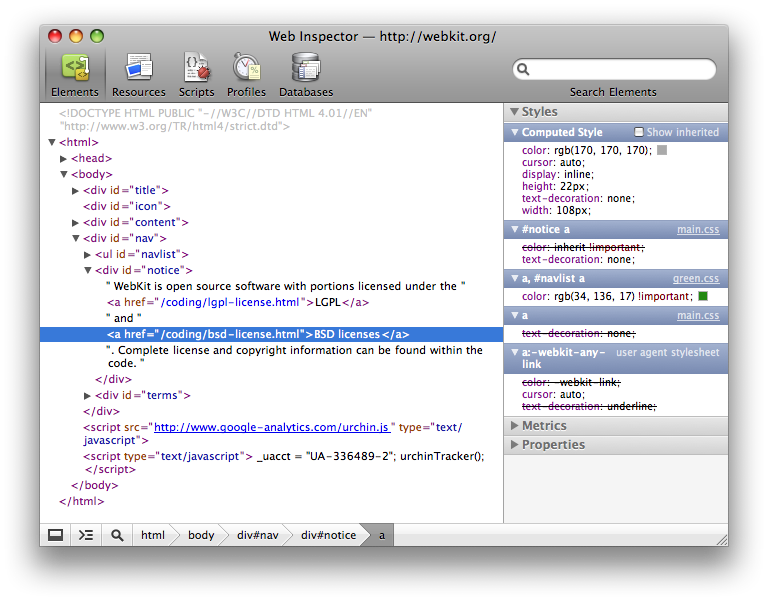
Safari dev tools are terrible and laid out in a completely un-intuitive manner. It's somewhat sad because the original Safari dev tools (which now live on as the foundation for Chrome's) were best-in-class.
At some point they decided to mimic Xcode which pretty much put a nail in them for being useful for anything.
I tried switching to Safari for a few months. Somehow it caused really odd beach balling and freezing of the computer. After a while I couldn't be bothered to jump all the various hoops to debug it, the solution wasn't simple or obvious, and switch to Brave, then finally back to Chrome when dark mode came about.
If uBlock stops working, I'll switch off in an instant though.
I use a lot of different platforms, and Safari only runs on a couple of them. Firefox lets me sync bookmarks, settings and extensions across all of them.
Safari has a few things not going for it:
1) ad blocking options are really inferior to chrome (for now) or firefox so a lot of what you gain in speediness gets taken away by some of the garbage that modern websites spit back at you.
2) The dev tools are confusing now. They have good ones but they need to redesign some of the UI on it.
3) There's not a good way to containerize things which means you end up having to open private windows when trying to login to services with different users.
While I disagree about ad-blocking and webdev options, Safari's reader mode and overall OS performance is a reason enough to never touch another browser. I have no use-case for multi-user containerization so no opinion there.
To add to others points I find that safari often lags behind implementing standards features and sometimes straight up implements then wrong. For that reason I make a point of not using it.
Also as far as I can see I have to upgrade my OS in order to upgrade by browser with safari. Sometimes I just can't be bothered to wait for a 40 minute upgrade to complete.
Safari redesigned their dev tools at some point a long time ago and made the interface (IMO) terrible. Until they did that I used to use it a lot more.
Safari is a great browser if you don’t need the most cutting edge features or extensibility though, and I believe it’s also the best optimized for battery life.
That's what WebKit's devtools look like, across all branded browsers. Blink stayed with the old layout and iterated on it.
I don't really care which one I use, but change for changes' sake is frustrating. I'm used to Blink/old Webkit and I don't see any reason to learn a new layout.
I legit can't even use the Safari tools even if I try. I have no idea how its supposed to work...the idea is not just terrible. It makes absolutely no sense and I have to google stuff to figure out how to use it every time I do.
People keep saying this, but I don't see how Safari dev tools are all that bad. My needs are quite simple, but by and large things appear to work in a way very similar to Chrome. What would be the main things you usually do with the dev tools where Chrome shines and Safari sucks? I'd like to understand what I'm missing by developing on Safari.
The safari dev tools used to be the exact same as chrome.
Then they were redesigned and everything was moved to different places.
I’m sure they still work fine, it’s just a learning curve to understand where everything was moved. It’s a matter of opinion but IMO the Firefox and chrome tools both have a more intuitive UI as well.
I have no idea if they're actually good or not when you figure out how to do it. But its getting to figure out where feature xyz is that drives me insane.
Chrome's tabs are nicer to use. They're visually easier to parse at a glance and arguably nicer to look at. Chrome's tab dragging is really tight and predictable.
Chrome's first paint is faster and more consistent. I think when I used macOS, Chrome had DNS preloading but Safari didn't.
It's been a while since I used macOS (RIP my 2012 13" MacBook Air), but Chrome's scrolling behaviour is more effective -- "solid" is how I'd describe it.
The omnibar is simple and usually shows exactly the right suggestions. Safari's address bar often didn't have the thing I wanted, and had extra things that I definitely didn't want or took a second for my brain to parse.
Chrome's context menu has better contrast, being black on white rather than black on silver. The choices are ordered better as well.
This is all that comes to mind right now.
An employee at my old company used a Mac Mini. She's not computer-saavy, but she far preferred Chrome over Safari. I asked her why and she couldn't describe it -- just that she was certain. I think it would be really insightful to do studies where you take tiny features from Safari, like the context menu colour, put them in Chrome and survey users on how they liked the product.
Tab management is worse on safari vs chrome. Until recently, there were no favicons in tabs so it was hard to differentiate, and once you have a lot of tabs you have to scroll, while on chrome there is no scrolling and you can use favicons to see all of your tabs at a glance.
FF has tab scrolling, but you also have tree style tabs which is better than chrome when you have a lot of tabs. Container tabs are also a big plus and is what made me start using firefox again. Chrome has a tree style tabs extension but the user experience makes it unusable for me. I can't find it for safari.
Firefox is still slower & consumes more CPU than chrome and safari after all of the improvements. Especially on a few heavyweight websites I use a lot, like facebook and google maps. Chrome is fast enough by comparison. So on my personal macbook I never use firefox because it's too slow.
If safari fixed it's tab issues then I would use it. But being silent apple, they will probably never fix that because it goes against some designer's idea of good design. Look how long it took to get favicons in tabs and it's still not the default option.
I'd use Safari over Chrome, but Safari has a couple of show-stopping bugs:
1. Swiping back on the trackpad to navigate backwards freezes the page for a couple of seconds. It then redraws the page with any updated elements (perhaps a refresh?).
2. The element CSS attributes in the dev tools often fail to update the DOM, duplicate with every keystroke, or revert what you have typed.
I'm sure it's fine for casual users, and you can't deny the battery life improvements when using Safari.
However as I posted in another comment, Safari is the new IE when it comes to bugs and standards compliance.
Here's an example that broke many many sites that use OAuth2 Auth Code Flow for login (including the main UI portal my company provides clients): https://bugs.webkit.org/show_bug.cgi?id=194906
This was also an issue in iOS, and since Apple doesn't let any other browsers actually use their own rendering engine on that platform (they're just wrappers around Safari's guts) this was broken for all iPhone users no matter the browser.
This is just one example. There's been numerous other issues such as disabling third party cookies by default.
I can only surmise that Mac users use Chrome/FF because the internet just _works better_ when they do.
This is probably the only reason I don't use Safari on macOS. Especially since their new extension API came out, most of the (few) extensions I was even able to find are now manual-install pains.
No extensions, no sync between devices if you don't want to (or can't) use iOS, and overall worse experience for me than anything else I can use on Mac. But I'm using Opera, not Chrome. I think that Vivaldi is currently the best browser, but unfortunately they don't have mobile version yet.
> The only place where Safari falls short is 3D CAD programs
Safari has poor controls if you care about privacy and having some modicum of control over the websites you visit.
In Chrome we can — on a per-site basis — disable/enable JavaScript; disable/enable cookies (and local storage); allow only some cookies; set which cookies clear on exit. You can also do more, but those are the ones I use.
You can do all that without extensions, and the controls are right there on the omnibar. In Safari, I can’t even do that with an extension (that I’m aware of).
Safari guesses what is privacy invading or not, and as such makes mistakes. I appreciate their effort, but I don’t believe it’s good enough.
This month we got reports of browser fingerprinting on iOS that happened via the phone’s gyroscope[1]. There was a way to not be affected: disabling JavaScript.
No profile support. I have four profiles in use right now, mostly "thanks" to the fact that Twitter can't run multiple accounts at once and Tweetdeck is garbage. Three "private" profiles and one for "work" stuff. That's a dealbreaker for me.
In addition, as a web developer, Chrome has way better development tools, and I like to use Chromecast integration and see full URLs in a real address bar, not just the domain like Safari does.
I also use safari as my main browser. When there is the rare case when a site malfunctions (not so rare anyways... sheesh its like IE all over again) I have brave-browser pulled from brew.
I’ve tried chrome in the past but it installed some sort of GoogleUpdater daemon without permission and I absolutely hate that. The same reason I don’t install MSOffice on my machines. If a desktop application needs a background service for wathever reason I don’t want it anywhere near my computers.
One word: iCloud. I don't feel like being encapsulated in Apple's ecosystem because their support on non-Apple products is limited, buggy, and/or non-existent.
Safari UX sucks -as someone who used windows all their life and recently transitioned to mac. i do not understand the choices and can't integrate them into my workflow
As others have said, Safari has vastly inferior dev tools. I am not a fan of the UI at all. Also, Safari generally lags other browsers in supporting features. They added beacon years after others, even Edge had support for it way before Safari.
As a web developer I don't like Safari. Safari is for me the number 1 reason to implement workarounds in HTML/JS/CSS because stuff does not work in Safari which is no problem on Chrome and Safari.
I use a Mac because they come with a bunch of tools that I need out of the box and are easy to use. The interface is nice and I am comfortable with it. On top of that, I have had the same MBP for 7 years. I have never been able to make a computer last 7 years before buying a MBP.
iTerm2 is a decent reason. I've tried to switch to Linux numerous times and I have yet to find a terminal app that is even half as good as iTerm. And command line tools on Windows are a joke currently, at least until the new one comes out soon (which looks good, but I doubt it will be better than iTerm). If you spend a lot of time in your terminal, being able to use the best one that behaves the way you want it to and is customizable nearly to a fault is a decent reason to stick to Mac
Vastly inferior dev tools, amateur tab management (no multi selecting tabs to rearrange or close), and a lack of extensions that are super valuable in web dev.
I keep trying to switch but every time it is clear that Safari is an inferior product (aside from efficiency, where it beats the heck out of Chrome).


I use Safari for both my own browsing and for development (a fairly large ClojureScript application), and it is by far the best browser on the platform by all measures (speed first and foremost).
The only place where Safari falls short is 3D CAD programs (like OnShape), where Chrome is faster and better.