Hacker Newsnew | past | comments | ask | show | jobs | submitlogin
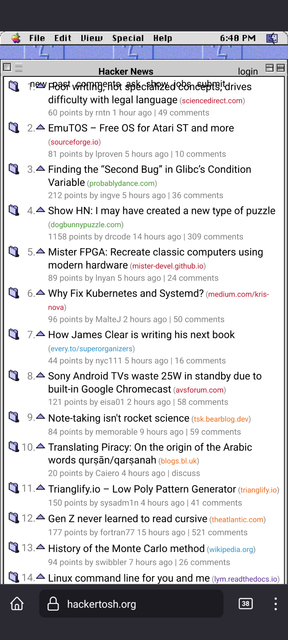
Hacker News stylized as a retro 90s macOS desktop (hackertosh.org)
282 points by anthonyhn on Sept 18, 2022 | hide | past | favorite | 52 comments
Hello HN, this is a small side project I worked on that restyles HackerNews to look like the desktop of an older version of MacOS from the 90s.

Internally, this is just a proxy to news.ycombinator.com that injects a custom `news.css` style sheet on some routes (login routes redirect back to HN). If you want to use the style sheet on the client side, there are browser extensions and a custom style sheet available at the github repo [0].

[0] https://github.com/anthmn/hackertosh.css

edit: try https://hackertosh.org/news if the page is blank


Neat! Will go very nicely with one of my desktop environment containers, which is inspired on Platinum as well: https://taoofmac.com/space/blog/2022/04/12/2330


Nice blog! Do you have a link to that XFCE mac os theme in the screenshot? Would love to try it out


So do I!


see above


Amazingly this is almost more readable than some parts of HN. I hate how text posts use a very low contrast text color on vanilla HN.


Fun!

One small immersion break for me was that the triangles next to comments are upvote buttons; I expected them to toggle the threads open and closed (even though they're pointing upwards - a toggle would point to the right in the open state). I'm not sure what an idiomatic upvote button would look like. A checkbox?


Ok you just made me go dig into the classic official Macintosh Human Interfaces Guidelines: http://interface.free.fr/Archives/Apple_HIGuidelines.pdf

(A classic wonderful document that even us Atari ST users used to consult when developing apps!)

See page 216 (240 in the PDF), "Controls Not Supported by the Macintosh Toolbox".

"Little Arrows The control that is two arrows pointing in opposite directions is commonly called little arrows. It is used to increase or decrease values in a series. Figure 7-16 shows one example of the little arrows control.'

So two small vertically stacked arrows as you'll see in their screenshot.

And you're right, those arrows to the left of the article title should be for expand/contract. (See 7-18, page 242 "Outline triangle control" in the same PDF)


Fun indeed. And you're right -- because those triangles were used to expand folder contents.

Upvoting, hmm... well together with downvoting, you could appropriate the number spinner/stepper widget [1], the tiny little up and down buttons attached to the right side of a number field? I'm not sure that was ever native to the Platinum design language [2], but IIRC Microsoft Office at least used it at the time.

[1] https://en.wikipedia.org/wiki/Spinner_(computing)

[2] https://en.wikipedia.org/wiki/Appearance_Manager

EDIT: whoops, cmrdporcupine's sibling comment basically says the same thing. Leaving this comment here in case anyone's interested in the additional links.


Has a small bug with Android Firefox:

https://i.ibb.co/ZRsFNQW/Screenshot-20220918-204917.png


Actually the same on iOS for me.


Yeah. It works in landscape mode, but not portrait.


If we're going for MacOS 8.5, it would have been cuter if this had been restyled as a Sherlock plugin.


"Sorry, we're not able to serve your requests this quickly."


Same. Ideally this "proxy" should just cache the front-page for 1-2 minutes and serve the cache.


Ideally, it should be using the API, which isn't rate limited.


That happens all the time on HN if you click "too quickly".


Or if your account is restricted in the number of posts you're allowed to write each day.


No then you get "you're posting too fast."


exactly


That"s understandable. HN was launched in 2007 :o)


Needs caching or consumption via algolia on the backend to avoid the ban hammer.


I think my boot floppy is broken, I just see a white screen.


Yeah, hug of death I think


I do too


Would be great to show only enough items per page so that the browser page doesn't need to scroll and only use the 'More' link.


The font looks atrocious without enabling antialising (which I abhor). Compare the headlines text with the menu bar image at the top left of the page: https://i.imgur.com/0MDGYpn.png

Taken on Windows 7/Chrome


Nice! Retro Mac is the prettiest OS GUI I can name (I've seen some even cooler but can't name them).


Love this to bits! One minor improvement is to add spacing between the user name and the "logout" text. Based on my own user name "usrme": https://imgur.com/M8PHS6g


I love this. I've seen the Windows 95 retro CSS but this retro Mac thing looks great!


https://i.imgur.com/vhER5zX.jpg this happened on Samsung Android with the link preview browser


Same on Android with Chrome.


The opaque icon text background - I made sure that my desktop stayed clutter free and my wallpaper always matched the background color to hide the ugliness of the opaque icon text background.


Great work! Not sure if it is only on my setup (Chrome and Win10), but it feels a bit snappier with a faster response time.


Gorgeous! Really like it. Thanks for working on this side project. Don't worry too much if it might seem almost useless.


This brings back memories of my old iBook G3 and PowerBook G4.

I miss that weird smiley face logo-thingy.


Hackertosh should be the name for the type of apple the Queen used on Snow White.


What do the different colors for the domain links at the end of stories mean?


The colors are just for style and a bit of usability. The color is determined by the first letter of the domain, for example here is the CSS for domains starting with 'w':

  .comhead>a[href^="from?site=w"] {
    color: #0098ce !important;
  }

There is also a extra rule for Apple domains (domains ending with 'apple.com') that adds an apple icon to the left of the domain:

  .comhead>a[href$="apple.com"]:before {
    content: "---";
    color: #ffffff00;
    background: var(--mac-apple-icon) 0px;
  }


*Mac OS :)


Beautifully executed! Really liked the concept, just bookmarked it! ♥


This looks way better! Setting it as my default.


I was a little sad that the clock doesn’t work :(


I was about to say that :/


I wish I could apply the current HN format to websites with dumpster fire UIs. Zerohedge comes to mind, and perhaps even Reddit (which isn't as bad)


You can still use the old Reddit UI by the way. If you use an account configure it in your account settings otherwise make sure you visit `old.reddit.com` e.g. `old.reddit.com/r/news`.

The day `old.reddit.com` stops working (and the API prevents a remake) is the day I stop using Reddit.


old.reddit.com is my go to. I still prefer HN's UI. It's slightly better. And I'm with you, when old.reddit.com goes away, so will I.


Often I prefer gopher://gopherddit.com and gopher://hngopher.com under Lynx, as it doubles as a Gopher and a Web browser.

Web links are just opened inside.


Both are pretty bad on a touch device.


yeah the usability is pretty much the same, with small links and icons impossible to click


As in, excellent information density so there's more actual content than empty space, high-contrast text that you can actually read, and colourful, stylish icons that you can tell apart from each other even if they're not 128x128px? Sign me up...


[deleted]


Guidelines | FAQ | Lists | API | Security | Legal | Apply to YC | Contact

Search: